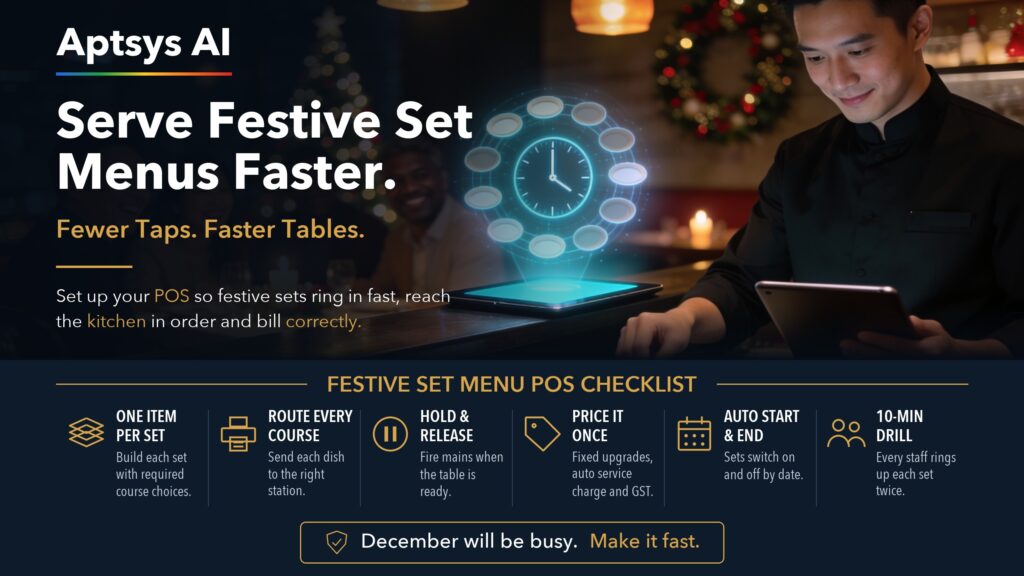
Every December, Singapore restaurants add festive set menus to drive bigger bills, and every December some of them find out that service gets slower because of it. The set itself is rarely the problem. The problem is how the set was built in the POS. A festive set menu POS setup that takes eight taps, two manual price adjustments and a shout to the kitchen will slow down every table that orders it.
Here’s how to set up festive sets so they make service faster, not slower.
Why festive set menu POS setup affects your service speed
On a normal night, most orders are à la carte items your team has rung up a thousand times. In December, a big share of orders become 4-course sets with choices, add-ons and dietary swaps, often for tables of 10 or more. If each set is keyed in as separate items, or as one item with a free-text note, three things happen:
- Cashiers and servers slow down, especially temp staff who don’t know the menu.
- The kitchen gets tickets with no clear order of courses, so mains and desserts get mixed up.
- Prices drift, because staff adjust them by hand when a guest swaps a course.
A good festive set menu POS setup fixes all three before the first booking walks in.
Step 1: Build each set as one item with fixed choices
Create each festive set as a single set item, with every course as a required choice group. For example:
- Christmas Set A ($88++ per pax): choice of starter (2 options), choice of main (3 options), dessert (fixed)
- Add-ons: wine pairing, upgrade to wagyu, extra side
Make choices compulsory so the order can’t be sent without them. That one rule removes the most common December mistake: a set that reaches the kitchen without its main. Keep it to 2–3 options per course. Every extra option is one more decision for the guest and one more tap for your staff.
Step 2: Route each course to the right station
A festive set touches several stations: cold kitchen, hot line, pastry, bar. Map every component of the set to its printer or kitchen display, the same way your à la carte items are routed. Then place a test order for each set and check what prints where. A starter that prints only at the pass, or a dessert that prints with the mains, is what turns a 2-hour table into a 2.5-hour table.
Hold courses and release them on cue. Starters fire straight away, and the mains are held until the server releases them, so a 12-pax table doesn’t get all four courses at once or wait 40 minutes between them.
Step 3: Get festive set menu pricing right once
Price sets per pax and let the POS handle 10% service charge and 9% GST automatically. Don’t let staff work out “++” pricing in their heads. Decide your rules up front and build them in:
- Upgrades: a fixed top-up (for example +$18), not an open price
- Kids’ or vegetarian versions: separate set items, not discounts
- Corporate packages: a named discount button, not a manual amount
When pricing lives in the POS rather than in your staff’s heads, bills come out right the first time and closing reports actually match.
Step 4: Schedule festive set menus to switch on and off
Give each set a start and end date, plus the meal periods it’s sold in (dinner only, or Christmas Eve and Christmas Day only). The set appears when it should and disappears on 1 January without anyone remembering to delete it. If you run several outlets, push the same set to all of them from one place instead of rebuilding it outlet by outlet. Our guide to multi-outlet menu management covers when to centralise menus and pricing.
Step 5: Put the set in front of guests on QR and kiosk too
If you run QR ordering or a self-service kiosk, add the festive sets there with the same choices and photos. Guests choose their own courses at the table, which is quicker than a server reading out options to 12 people, and it takes pressure off temp staff. Put the set at the top of the menu during December so guests see it first.
Step 6: Run a 10-minute set menu drill
Before the first festive night, have every staff member ring up each set twice: once straight, and once with a swap and an add-on. Then check the kitchen ticket and the bill. Ten minutes in the afternoon is much cheaper than finding a routing mistake during a 40-pax company dinner.
For the rest of your pre-December setup (temp staff logins, printers, payments and nightly reports), work through our Christmas POS checklist.
How Jade POS handles festive set menus
Jade POS is built for nights when sets make up most of the orders. Set meals with required choices ring in with a few taps, and each component prints to the right station. Course hold and release lets your servers send mains to the kitchen when the table is ready, not when the order is placed. Set start and end dates switch festive menus on and off automatically, and 10% service charge and 9% GST are calculated without manual adjustments. AI set meal and upsell prompts suggest add-ons at the point of order, which helps temp staff who are still learning the menu.
December will be busy either way. Your festive set menu POS setup decides whether it’s also fast.